


In the official list it appears as form 150, code IVA01, «Value Added Tax», monthly. It replaced the old D-104 when TRIBU-CR came in; if you are coming from that form, see what changed from D-104 to form 150.
Who files VAT, and how often?
VAT is filed by every taxpayer in the standard regime registered for this tax —not those in the Simplified Regime, who pay differently—. And they file it every single month, whether they sold a lot, a little or nothing.
And it must be filed even when there is nothing to pay: even if you did not sell, or if input exceeds output and you end up with a credit balance, the «nil» return is filed anyway. Not filing it triggers a penalty for omission.
«Taxpayers… must settle the tax no later than the fifteenth calendar day of each month, by sworn return of the sales of goods or services for the previous month. The obligation to file the return subsists even when the tax is not paid or when the difference between output VAT and input VAT represents a balance in the taxpayer's favour.» Value Added Tax Act (Law 6826), article 27 (translated)
What you need before you start
To get the return done in one sitting, have at hand:
- Your sales for the month, split by rate (how much you sold at 13 %, at 4 %, at 1 %, exempt…). The D-150 is no longer built by economic activity, but by rate.
- Your purchases for the month, also by rate, with the VAT you were charged (the one you can use as a credit).
- Your TRIBU-CR access with your user, and the company's ID number.
If you invoice with software that keeps the sales and purchase ledgers by rate, that breakdown is already done: it is exactly what the D-150 is going to ask for.
The D-150, screen by screen
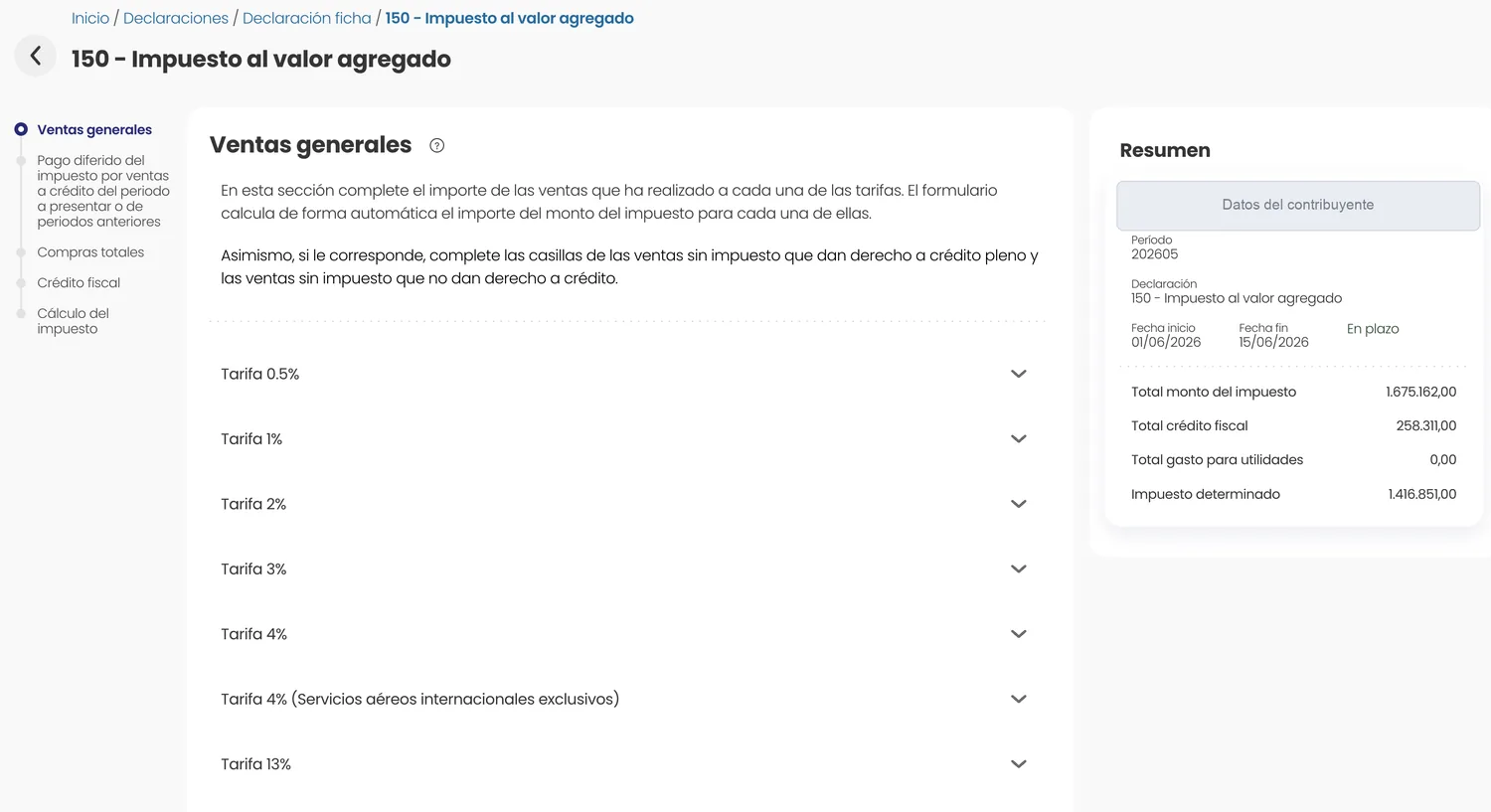
The form runs through five steps, shown in TRIBU-CR's side bar: Ventas generales (General sales), Pago diferido (Deferred payment), Compras totales (Total purchases), Crédito fiscal (Input VAT) and Cálculo del impuesto (Tax calculation). On the right, the Resumen (Summary) shows how the tax stands as you fill it in.
1. General sales: your output VAT
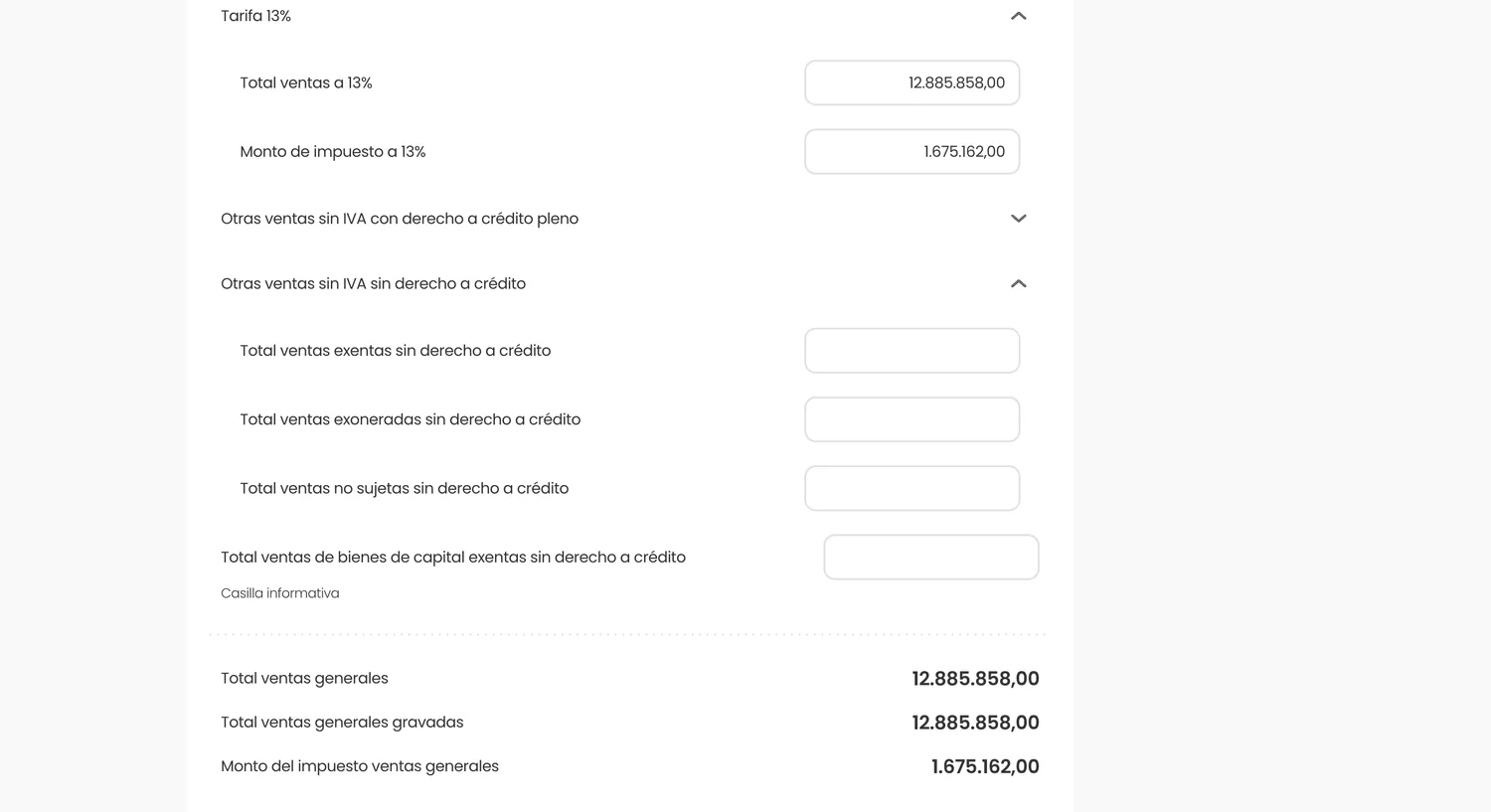
On the first screen you enter how much you sold at each rate. When you type the total sales for a rate, the form works out the tax itself: that is why you only type the sale, not the tax.
Inside each rate goes the total sold and the form fills in the tax amount. In the example, ₡12,885,858 sold at 13 % produce output VAT of ₡1,675,162.
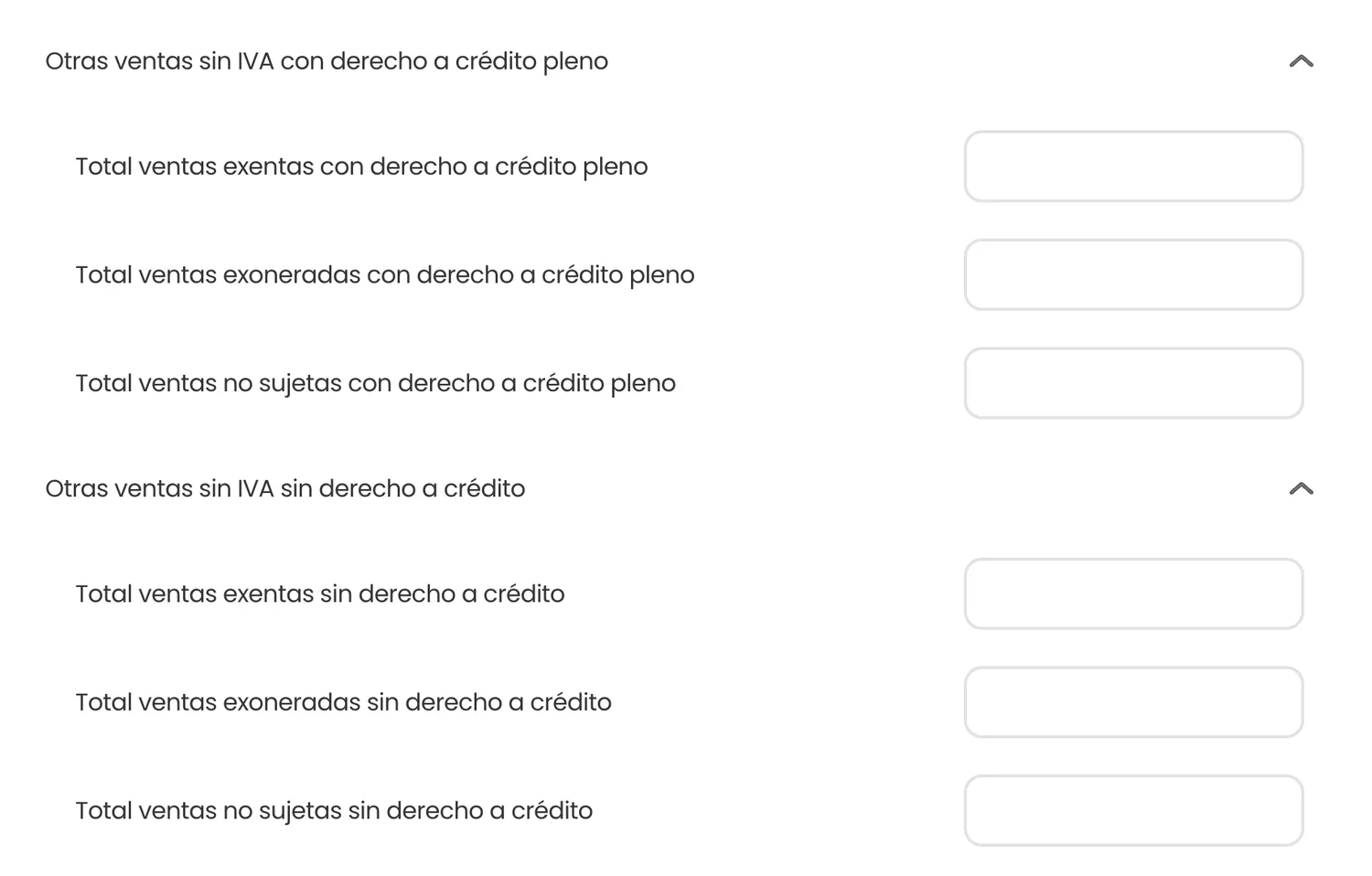
Further down are the sales without VAT: exempt, exonerated and non-subject, split by whether or not they give a right to credit. If you are unsure of the difference, see exempt, non-subject and exonerated: they are not the same and the form treats them differently.
2. Did you sell on credit? Deferred payment
The second screen asks whether you take the deferred payment of VAT on credit sales. It is a mechanism of article 27 of the VAT Act: certain taxpayers (SMEs, independent professionals and others registered) may declare the VAT of a credit sale when they collect it rather than when they invoice it, with a 90-day cap.
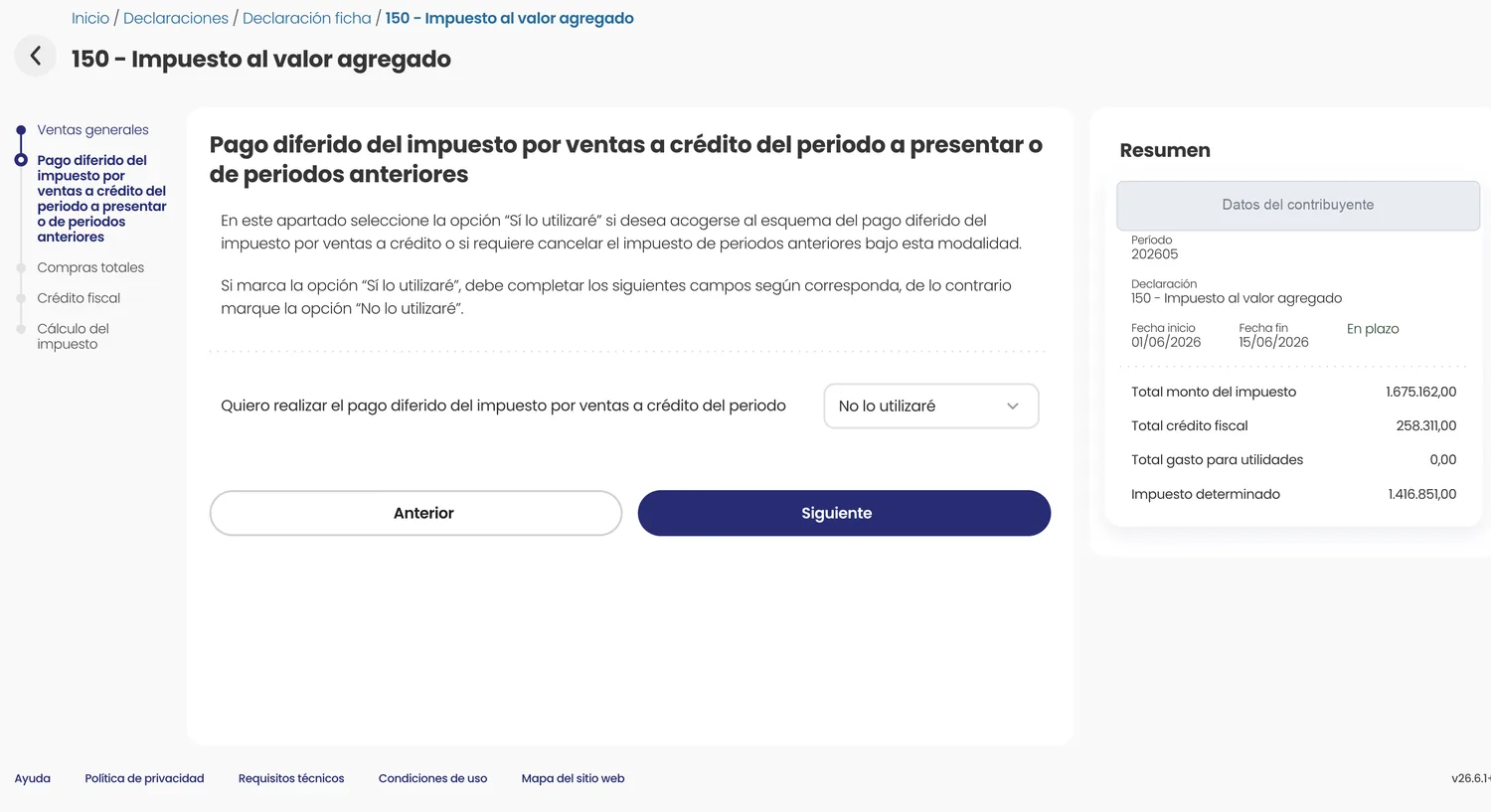
Most people leave «Will not use it». It only makes sense to tick it if you sell on credit and your invoicing software issues the electronic payment receipt; otherwise, do not turn it on, because then the VAT is declared anyway in the month of the invoice.
3. Total purchases: the VAT you bore
Here you enter how much you bought at each rate. As with sales, you type the amount and the form works out the input VAT (the VAT your suppliers charged you). That input VAT is the basis of your credit.
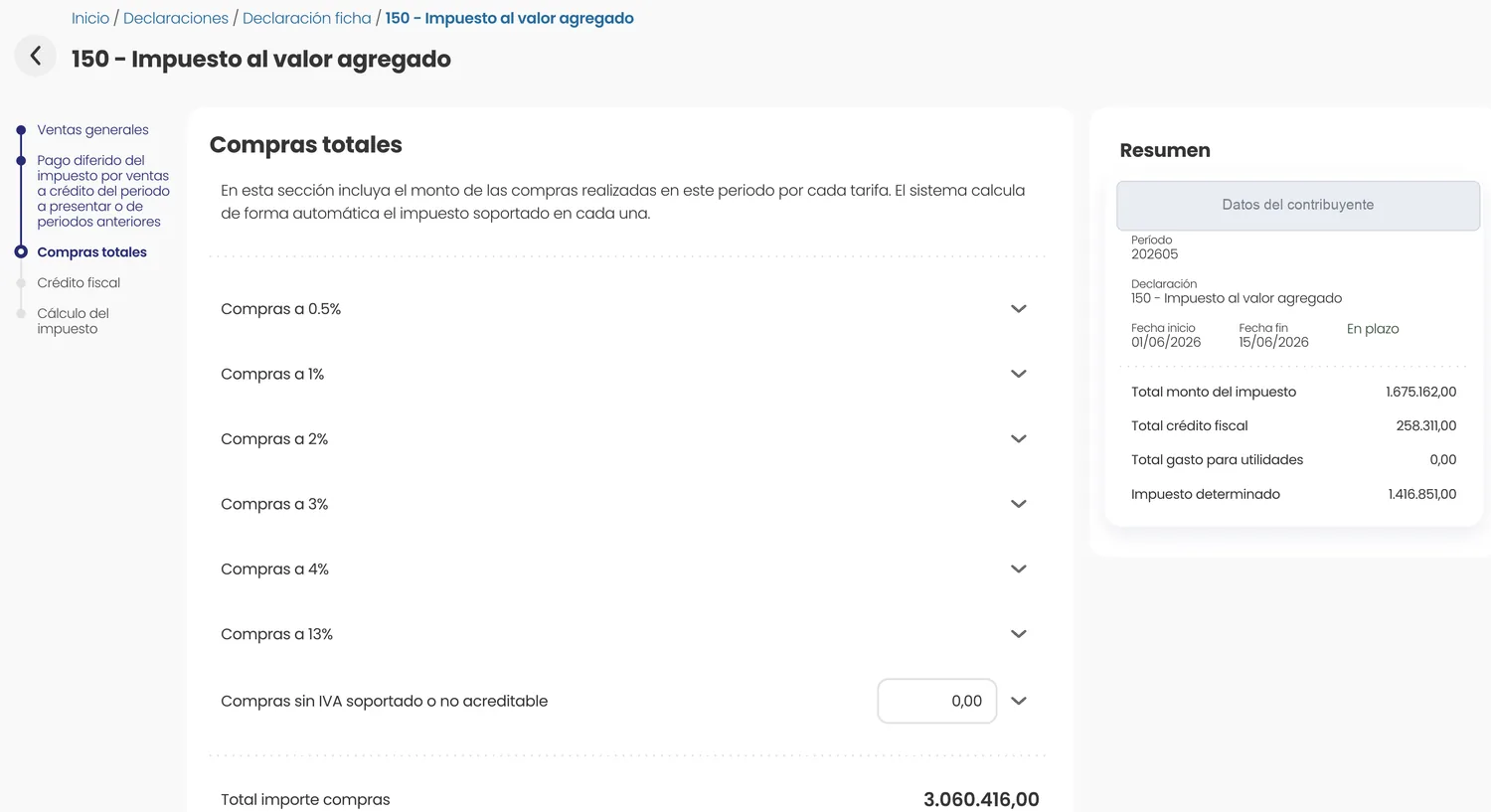
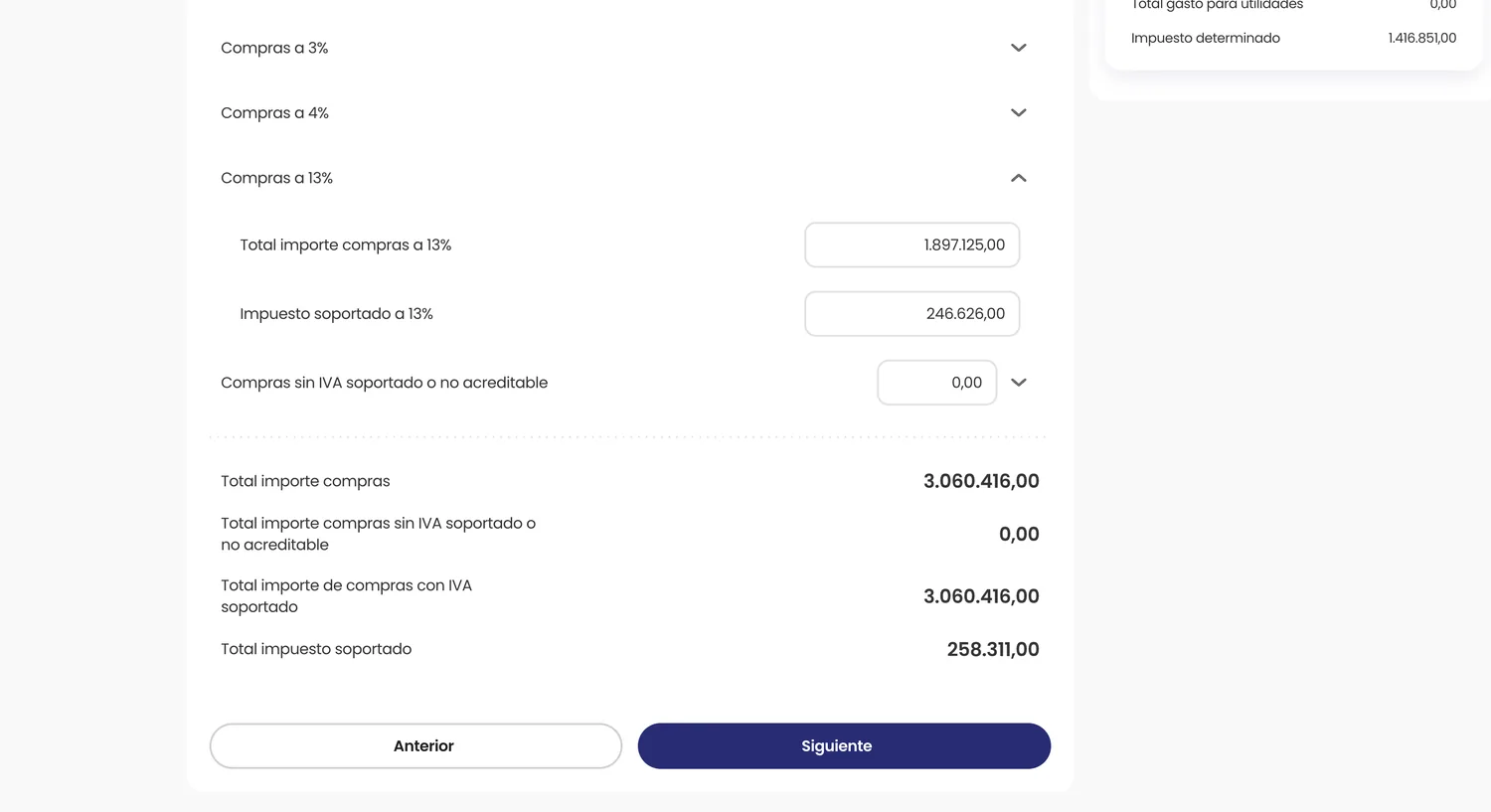
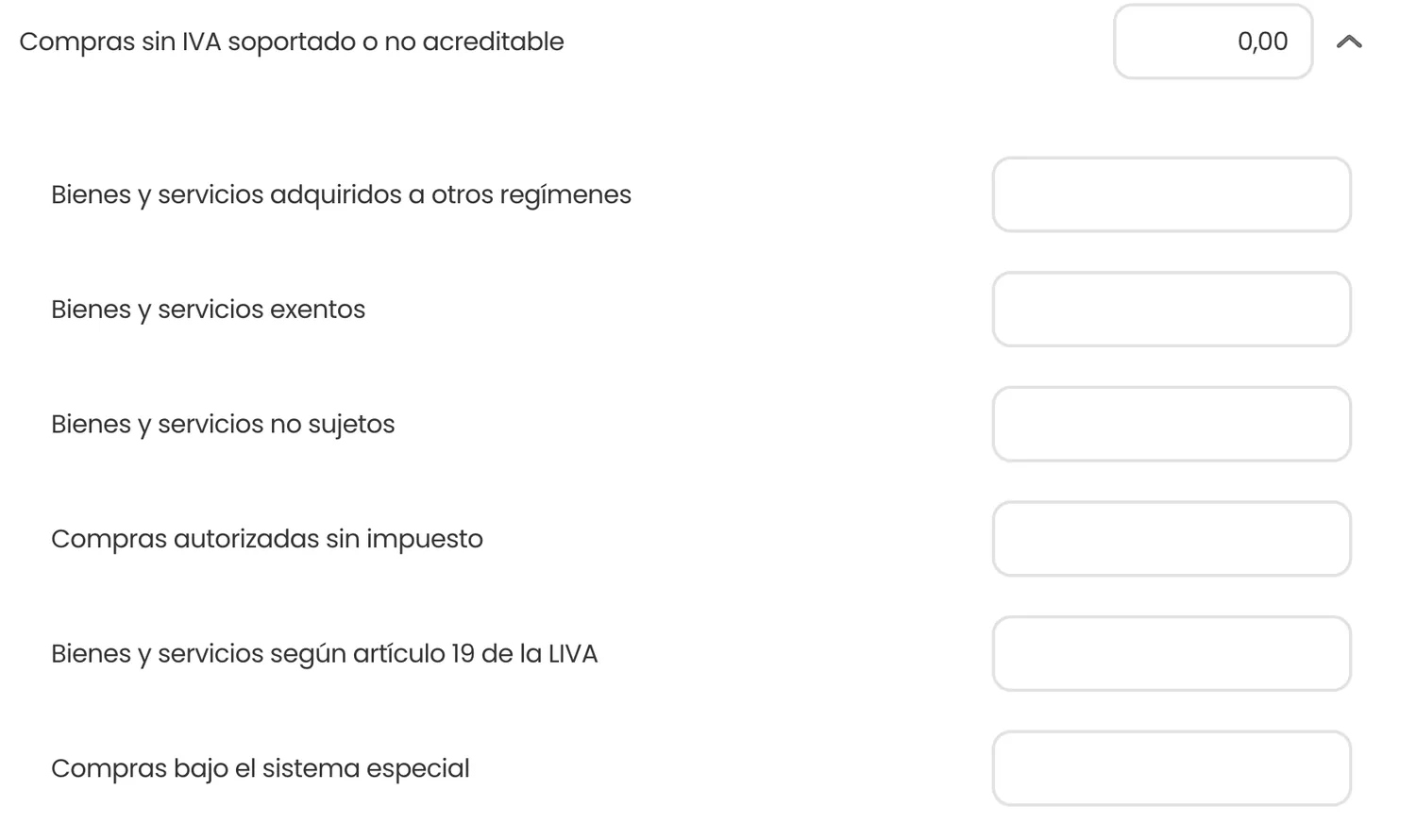
The «Purchases without input VAT or non-creditable» box holds what you bought without VAT or whose VAT you cannot use as a credit: exempt and non-subject goods and services, those bought from other regimes, and so on. It neither subtracts nor adds credit; it is informative.
4. Input VAT and proportionality
This is the screen that confuses people most. If you sell at a single rate with a full right to credit (the most common case), the credit is simple: all the VAT you bore on your purchases is your credit. The form brings it already calculated.
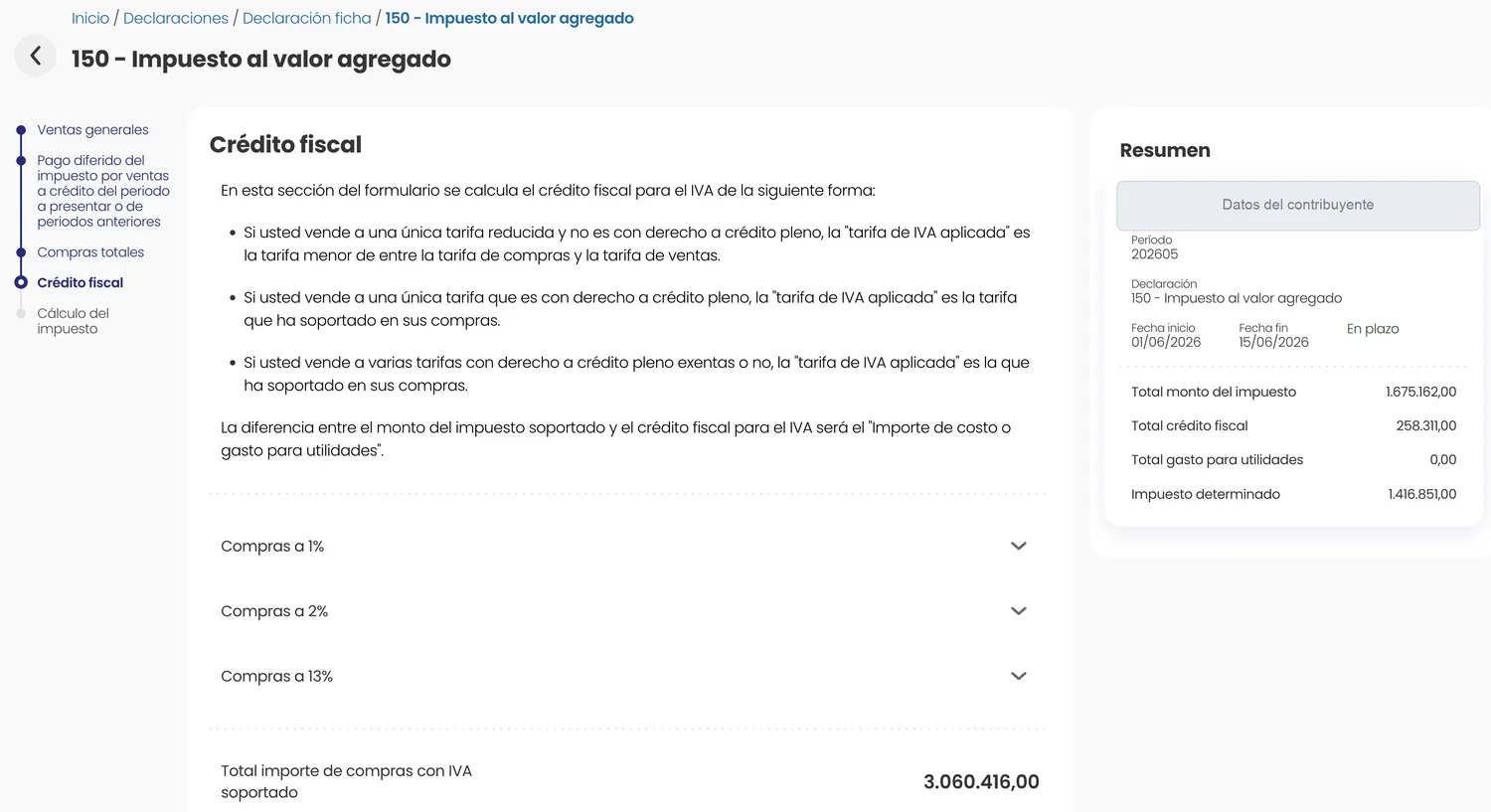
Proportionality appears when you sell at several rates or combine taxable sales with exempt sales without a right to credit: then you cannot use all the VAT on your purchases, only the part proportional to your sales with a right to credit. The form works out the applied VAT rate and, with it, the credit for each purchase rate.
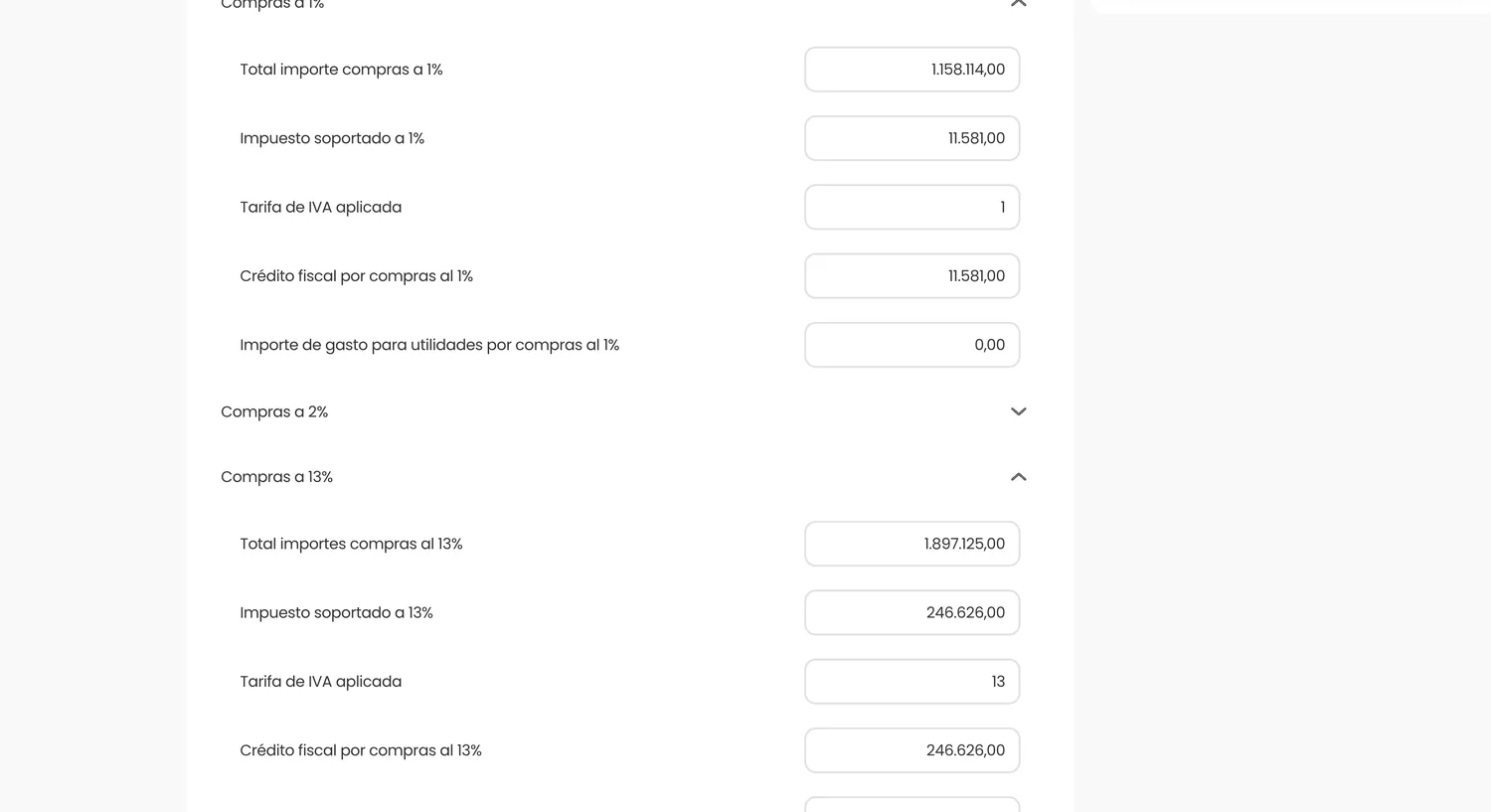
5. Tax calculation
The last screen is not filled in: it only shows the result. It takes the tax amount on your sales (the output VAT) and subtracts the input VAT credit on your purchases. The difference is the assessed tax: what you have to pay.
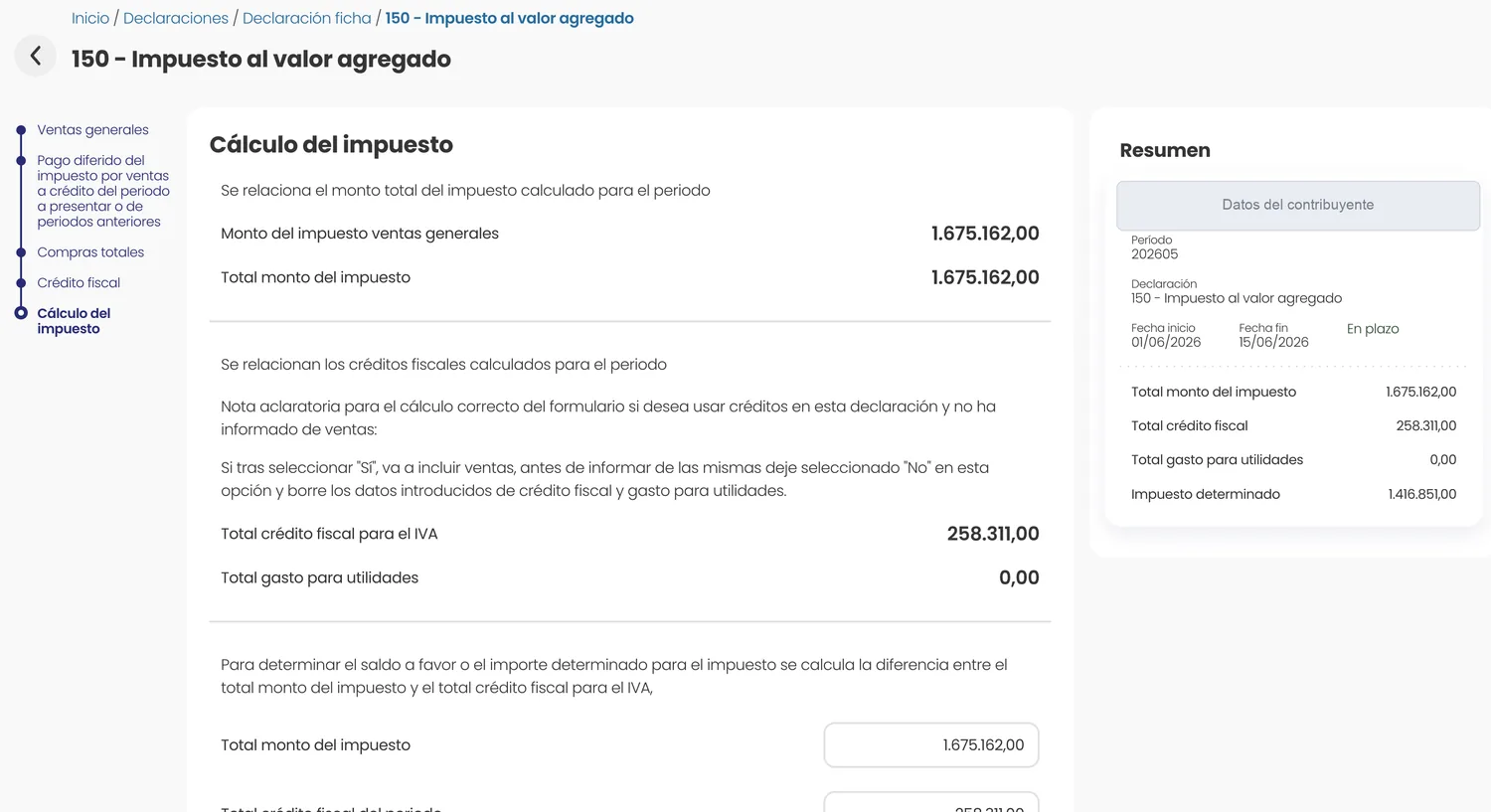
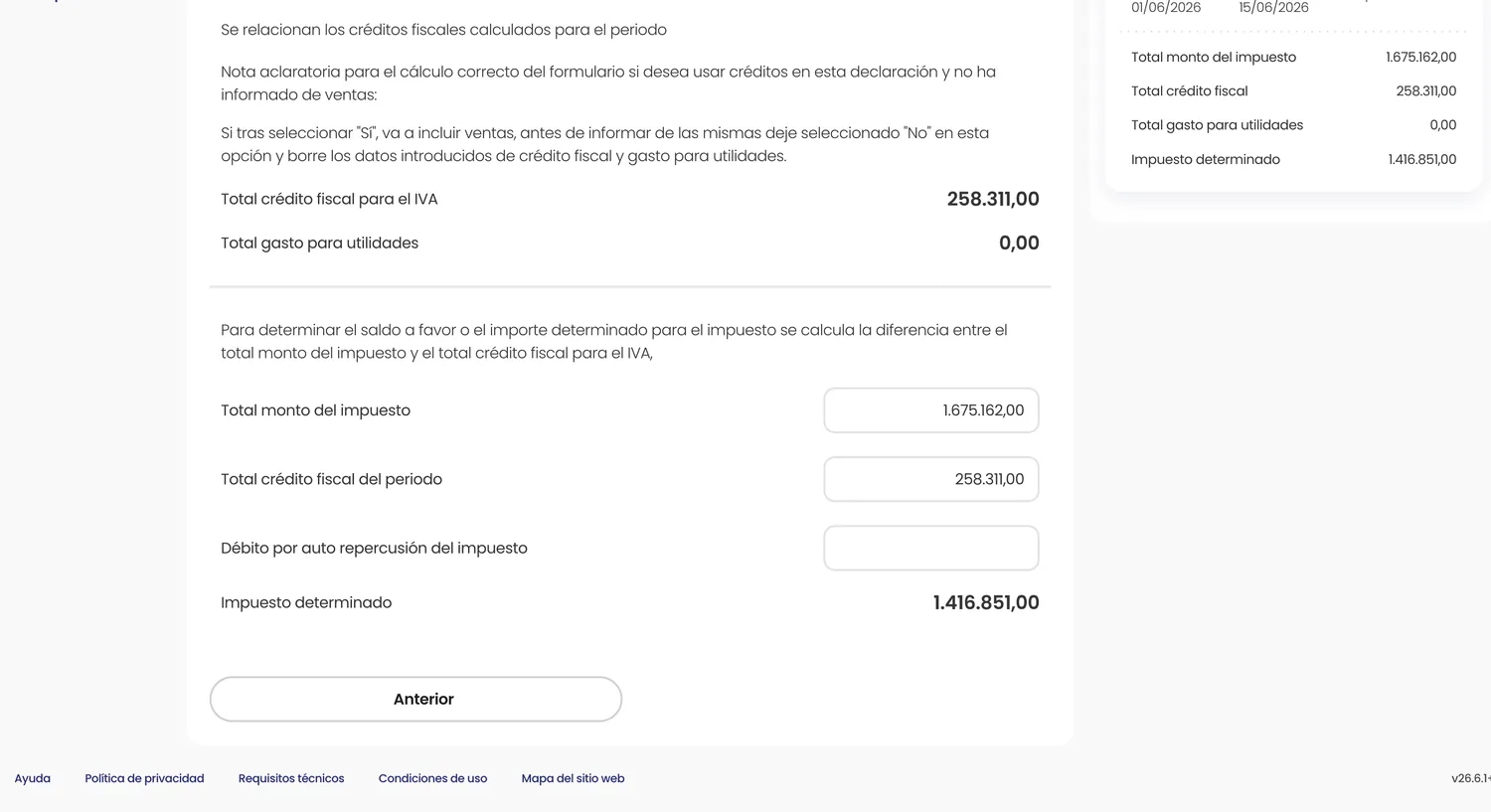
6. File and pay
Once you have checked the result, you file the return in TRIBU-CR and get the acknowledgement. The VAT on a cash sale is paid on filing; it can be paid through bank connectivity or with the slip the system generates. Keep the acknowledgement: it is the proof that you filed on time.
A worked example
With the figures from the screens above, the month looks like this:
| Item | Amount |
|---|---|
| Sales taxed at 13 % | ₡12,885,858 |
| Output VAT (VAT on sales) | ₡1,675,162 |
| Purchases for the month (with input VAT) | ₡3,060,416 |
| Input VAT (VAT on purchases) | ₡258,311 |
| Assessed tax to pay | ₡1,416,851 |
The sum is always the same: output − input. Had the input been greater than the output, the result would be a credit balance carried to the following months, and the return is filed anyway.
Mistakes that throw the return off
- Building sales by activity and not by rate. The D-150 asks for the breakdown by rate. If your working paper groups by economic activity, it no longer fits the boxes.
- Treating as credit a VAT that gives no right to credit. The VAT on exempt, non-subject or non-creditable purchases is not credit: it goes in «purchases without input VAT».
- Forgetting proportionality. If you sell at several rates or mix taxable with exempt sales without a right to credit, you cannot credit all the VAT on your purchases.
- Not filing the nil return. Even if you did not sell or you end with a credit balance, it must be filed; omitting it triggers a penalty.
- Turning on deferred payment without issuing the electronic receipt. If you tick it but your software does not issue the electronic payment receipt, the VAT is declared anyway in the month of the invoice.
Ticuenta builds your D-150 box by box
If you invoice with Ticuenta, the software keeps the sales and purchase ledgers by rate and hands you the D-150 draft ready to copy into TRIBU-CR, with the breakdown the form asks for. No adding figures by hand, no wrong box.
See how it worksFrequently asked questions
When is VAT filed in Costa Rica?
VAT is filed every month, within the first 15 calendar days of the following month. A month's return is filed in the first fortnight of the next month; if the 15th falls on a weekend or holiday, the deadline moves to the next working day.
Do you have to file even if you did not sell?
Yes. The VAT return is filed even if you did not sell anything or you end up with a credit balance; the «nil» return is still mandatory and not filing it triggers a penalty for omission.
How is the VAT to pay calculated?
The tax to pay is the output VAT (the VAT on your sales) minus the input VAT (the VAT on your purchases with a right to credit). If the input exceeds the output, the result is a credit balance carried to the following months.
What is form D-150?
The D-150 is the form used to file Value Added Tax in TRIBU-CR. In the official list it appears as form 150, code IVA01, filed monthly, and it replaced the old D-104 when TRIBU-CR came in.
What is input VAT proportionality?
Proportionality limits the credit when you sell at several rates or combine taxable sales with exempt sales without a right to credit: in that case only the part of the input VAT proportional to the sales with a right to credit can be credited.
Verified on 11 October 2026. Tax rules change: check the current version before applying this to a real case. The pictures are of the real TRIBU-CR form, with the taxpayer's data hidden.
Sources: Ministry of Finance VAT Act 6826, current text (Sinalevi) TRIBU-CR